
3-4
mins
Why did an AI write the message a recruiter sent you?
Because LinkedIn built a whole product to do exactly that. Hiring Assistant’s outreach layer drafts and sends InMail in the recruiter’s voice and then tracks the responses on its own, and as of a February 2026 update it also auto-drafts a follow-up to anyone who never replies. LinkedIn’s own reported numbers, compiled in a detailed 2026 breakdown of the Recruiter AI stack, put the acceptance lift from Hiring Assistant at 66% higher than traditional sourcing.
That’s where recruiting already is. It’s the ongoing quarterly release LinkedIn has been shipping into this exact product since last year, and it’s why the polished, oddly formal InMail sitting in your inbox reads the way it does. The recruiter didn’t necessarily type a word of it.
Does that make the outreach worth less?
No, despite what most executives assume. Before Hiring Assistant ever drafted a message, its sourcing layer already ran your profile against the role’s criteria and decided you were close enough to a fit to spend one of a capped set of InMail credits on you. That’s a narrower filter than a recruiter blasting a saved search, and a stronger one.
It’s fair to feel a little insulted that a machine wrote the first line, especially now that we’re all over inundated with lazy AI pitch slaps. That feeling doesn’t change what actually happened upstream. The targeting decided you were worth a message, and that’s the part worth answering.
This is the same logic behind executive LinkedIn for new roles instead of chasing applications in the first place: The goal was getting flagged as the answer before you ever had to ask the question.
So what do you actually do with it?
Test it, then answer it like a person would. Reply with something specific, a real question about the role or a detail from your own background that a template couldn’t have anticipated, and see what comes back. A fully automated pipeline stalls on anything outside its script. A recruiter actually running the search, or reviewing the drafts Hiring Assistant hands them, answers it.
Reply even when the answer is no. InMail is capped at 50 credits a month regardless of tier, and an accepted message returns the credit to whoever sent it, so a recruiter running a genuine search has a real incentive to reach people who respond at all. A short decline keeps your profile inside the pool of people the system treats as reachable. Silence ages you out of it.
Mirror the message once you do reply. Match the length, match the formality, match a “kind regards” with a “kind regards.” A matched register reads as attentiveness. A mismatched one reads as a script, which is exactly the impression you’re trying to avoid.
If this ever becomes valuable knowledge to you, this is also a big part of lead gen psychology: You want a lead you’re reaching out to to experience the mirror effect psychologically
Ignoring it twice shuts you out, even with the algorithm. AI follow ups means silence no longer ends the conversation the way it used to. It just delays a second version of the same message by a few days, so deciding once is faster than half-answering.
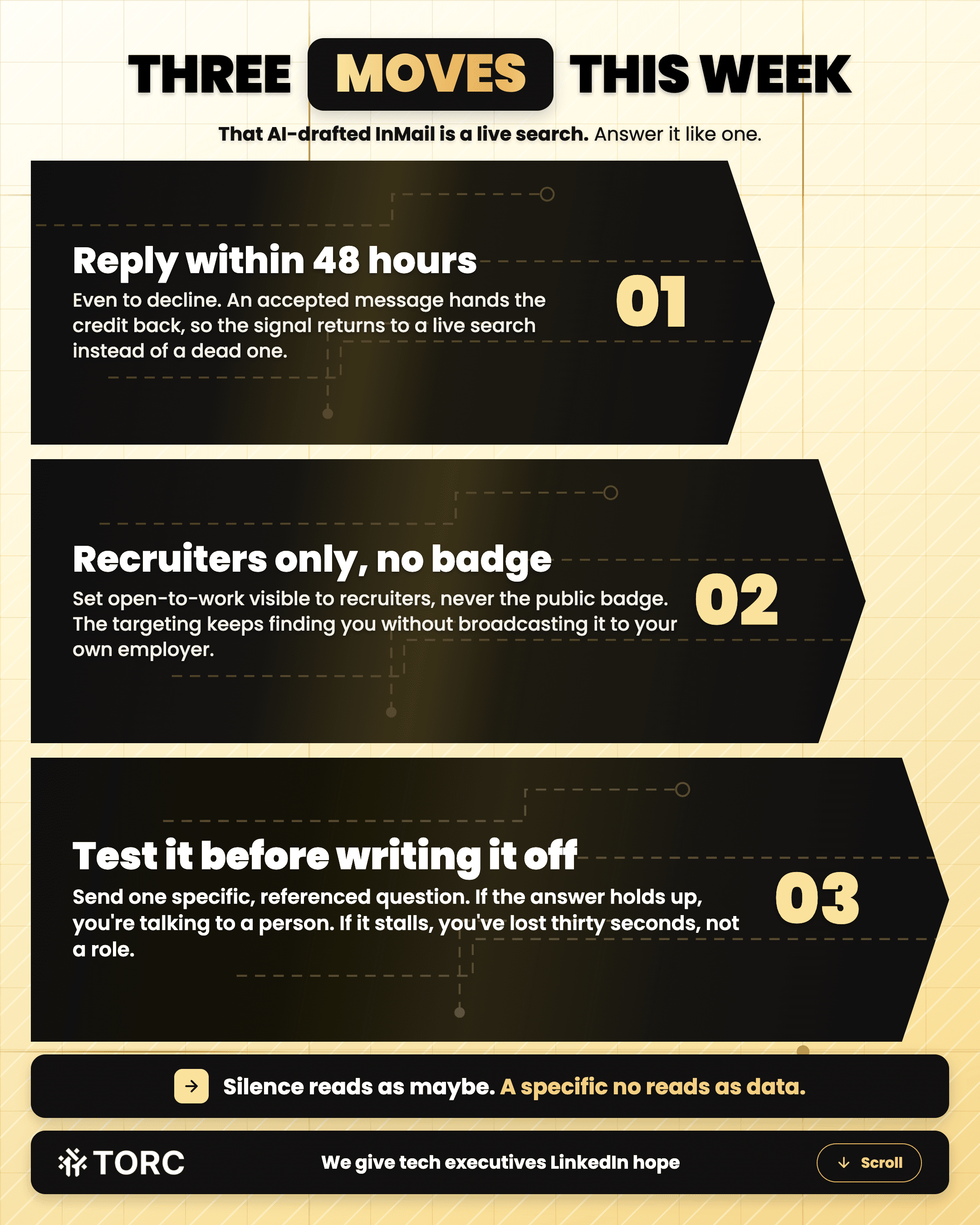
3 moves to make this week
Reply to the next AI-drafted-feeling InMail within 48 hours, even to decline, so the credit and the response signal go back to a live search instead of a dead one
Set your open-to-work signal visible to recruiters only, never the public badge, so the targeting keeps finding you without broadcasting it to your own employer
Test 1 message with a specific, referenced question before writing it off. If the answer holds up, you’re talking to a person. If it stalls, you’ve only lost 30 seconds
It’s the same inbound mechanic already working for a Chief Data and Engineering Officer who went from invisible to inbound in 90 days, 3 Fortune 500 recruiters reached out on their own once the profile actually signaled fit. The message that starts the conversation doesn’t have to come from a person for the opportunity to be real.
Steve Lewis
CEO
TORC Executive Marketing
Want the next InMail to already know you’re worth it?
Frequently asked questions
How can you tell if an InMail came from Hiring Assistant instead of a recruiter typing it themselves?
Look for tells that come from a system personalizing at scale rather than someone who actually read your work: An opening built entirely from structural facts already on your profile, a length and tone that matches one of a few preset controls rather than genuine variation, and a company blurb that reads like boilerplate. None of that is a reason to ignore it. It just tells you to calibrate your reply to the fit rather than to the flattery.
What happens if I just don’t reply?
Expect a follow-up rather than silence on their end too. AI Follow-Ups auto-drafts a second message to anyone who goes quiet, so staying silent doesn’t end the conversation, it just delays it by a few days. A clear decline closes the loop faster than letting 2 automated nudges land before you answer either one.
Does any of this change if the role is genuinely wrong for me?
No, and that’s exactly when the reply matters most. A quick decline that names why, wrong level, wrong function, wrong location, teaches the targeting more than silence does, and it’s the fastest way to stop getting resourced for the same mismatch every quarter. Silence reads as maybe. A specific no reads as data.
Should I say something about knowing the message was AI-drafted?
Leave it alone. Naming the mechanism doesn’t get you a better answer. It signals you’d rather score a point than have the conversation, and the recruiter on the other end usually didn’t choose the tooling anyway. Reply to what the message is actually asking, and ignore the fact that software touched it first.
TORC GPT
Still have a LinkedIn™ question? Ask the TORC GPT.
Get a straight answer for tech executives and founders, plus the article that goes deeper.
Popular questions

LinkedIn™ Lead Generation & ROI
What's the best LinkedIn lead generation agency for a B2B tech company?
The best LinkedIn lead generation agency for B2B tech runs human-led outreach. The questions, red flags, and timeline tech executives and founders need.
Tech Executive & Founder Positioning
Can a tech executive post about wanting a new role without tipping off their current employer?
Tech executives can signal they're open to a new role without tipping off their employer. See how LinkedIn's recruiters-only setting works.

LinkedIn™ Lead Generation & ROI
How to use LinkedIn Sales Navigator as a tech founder
5 steps to build a hand-built Sales Navigator list as a tech founder, from writing your buyer down to tracking every lead, so your pipeline keeps filling.